
We learn to account for an import invoice in Odoo Spain
(OCA)
Today we have prepared a brief guide on how to account for an import with Odoo whether in the SII or not, from our invoice with its DUA. For this, it is important to have the following DUA modules installed and to update the chart of accounts:
- Account chart update
- I10n_es_dua
- I10n_es_dua_sii
We will start with this example in the video tutorial or manual below:
- Video How to account for an import v16 and earlier:
- Video How to Account for an Import Invoice v17 and later:
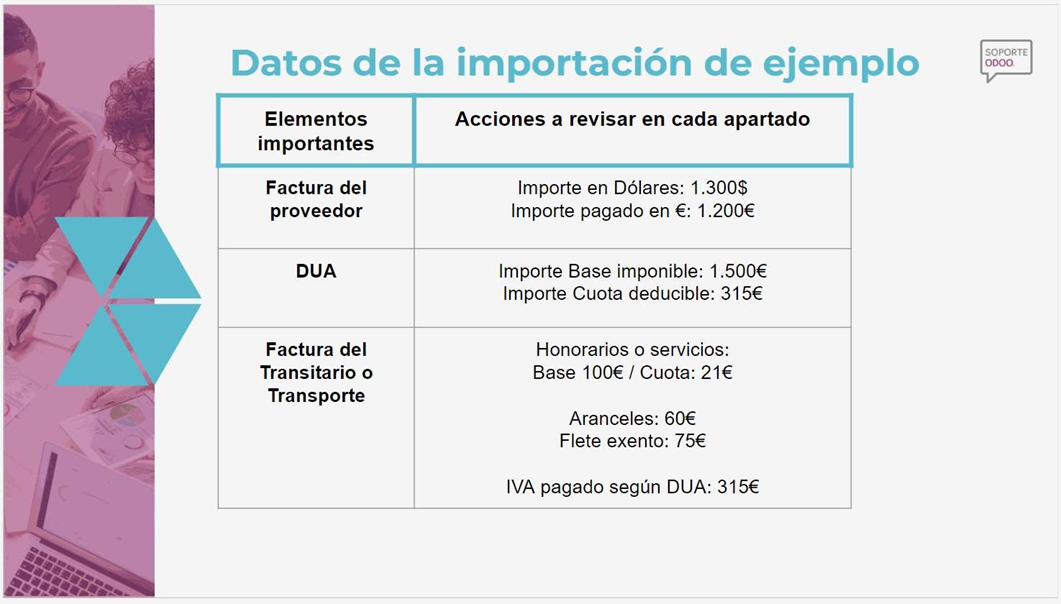
We have 3 documents
Customized service solutions
We offer personalized services designed to meet your needs, ensuring optimal results and your satisfaction.
24/7 customer support
Our team is available 24 hours a day to provide you with reliable and quick support when you need it.
Exclusive service benefits
Take advantage of the exclusive benefits and value-added services that set us apart and enhance your overall experience.
How is an import accounted for?
1) Account for the DUA
There are several options, but if we have accounting knowledge, I like this option to have the payments squared for each supplier, and it is accounted for in the following way:
Step 1)Important to account for the DUA
The most important thing is to declare in the import box of model 303 the total DUA that the tax office communicates to us at customs, which you can check in DUA Consultation AEAT. https://sede.agenciatributaria.gob.es/Sede/tramitacion/DB01.shtml
a) We create a supplier invoice and indicate in the supplier or in other information on the same invoice the tax position of IMPORTER WITH DUA.
b) We enter the date of the DUA and the invoice number, the corresponding DUA number (ESyearxxxxxxx). The tax office verifies that the length of the DUA is correct when sending it to the SII, so it is important to indicate it correctly.
c) In the invoice lines, we enter the purchased products or import them from the corresponding purchase order and enter them with VAT Tax 21% on imports of Goods. The total base and VAT amount should be the same as indicated in the DUA. In case of discrepancies in amounts regarding what was imported from the purchase order, an adjustment invoice line can be entered and the difference included with the 21% import tax.
In our example, we are going to enter an invoice line with a Base of €1,500, Import Tax of 21% on goods, and the VAT amount of €315. This invoice will be sent to the SII.
(NOTE: If we create this invoice as a supplier with the tax position of Importer with DUA in the name of the freight forwarder, we will "save" a final step of transferring the €315 of VAT paid to the freight forwarder.)
(NOTE: The tax position of Importer with DUA activates for us that when we send this invoice to the SII of the tax office, the name and CIF of the supplier indicated is that of the company itself.Odoo,because it is the company itself that "pays" the DUA that customs charges against the company.)

2) Record the invoice from the freight forwarder or transport
We will account for the tariffs separately, which are not reported to the SII, regarding other taxable taxes such as fees or freight.
a) We create a supplier invoice with expenses including VAT and taxes subject to VAT or exempt in the name of the freight forwarder. (We ignore the item on the invoice that is the VAT amount paid by the freight forwarder on our behalf, since we have already accounted for that amount in the DUA)
In our example, we will enter an invoice line with a Base of €100, VAT of 21% on current services with a VAT amount of €21 and
a second line of €75corresponding to the freight ortransportwith a rateofExempt VAT.This invoice will be sent to the SII
b) We create a second supplier invoice in the name of the freight forwarder with Tariffs and items that are not reported to the SII because they are not subject to VAT. The selected Tax type is DUA EXEMPT so that it is not sent to the SII.
In our example, we will enter another invoice with an invoice line with a Base of €60 corresponding to the tariffs and DUA TaxEXEMPT, which we will not send to the SII.3) Adjustment entry for DUA Base and payments

In this manual entry, we will adjust the amounts and reconciliations of the previous invoices, such as:
In this manual entry, we will adjust the amounts and reconciliations of the previous invoices, for example:
a) Difference between the taxable base declared in the DUA and the actual amount paid to my supplier. Normally, customs estimates a different amount than what is actually paid to our supplier, due to different valuations on the products or the exchange rate, causing the DUA base not to be the actual amount paid to my supplier. For this, we make a manual entry in Accounting, Accounting entries, and adjust that amount.
a1 - If the DUA has declared a higher base than what was paid to the supplier, that is, Customs has considered that my products are worth more, this entry must be made for the difference in amounts by subtracting the expense from account 600 for the purchase of Goods:
xxi (account 4000 of the import supplier) A (account 600x) xxii
a2 - If the DUA has declared a lower base than what was paid to the supplier, that is, Customs has considered that my products are worth less, this entry must be made for the difference in amounts by adding the expense from account 600 for the purchase of Goods:
xxi (account 600x) A (account 4000 of the import supplier) xxii
With this adjustment, we can go to the DUA invoice and reconcile that amount so that we have pending the base actually paid to the supplier.
In our example, the taxable base of the invoice paid to the supplier amounts to€1,200,and the base that the tax authority in the DUA has taxed anddeclared is €1,500, therefore, in the DUA we have accounted for €1,500 - €200 = €300 more in account 600x, overcharging usexpenses. The entry to be made would be the following:
€300 (account4000from the import supplier) A (accounting account600x) 300€
b) Adjustment of the VAT payment for the Single Administrative Document (SAD), transferring it to the freight forwarder. We have seen that in the first step we recorded the VAT amount against the import supplier, when in reality we paid it to the freight forwarder who was responsible for processing the SAD. Therefore, in this entry we will transfer the balance from the supplier's account 400x to the freight forwarder's supplier or creditor account 400x or 410x, making the following accounting entry:
In our example, the VAT amount of the DUA amounts to 315€ and we are going to make this entry:
315€ (accounting account 4000 of the import supplier) A (accounting account 400x or 410x of the freight forwarder) 315€
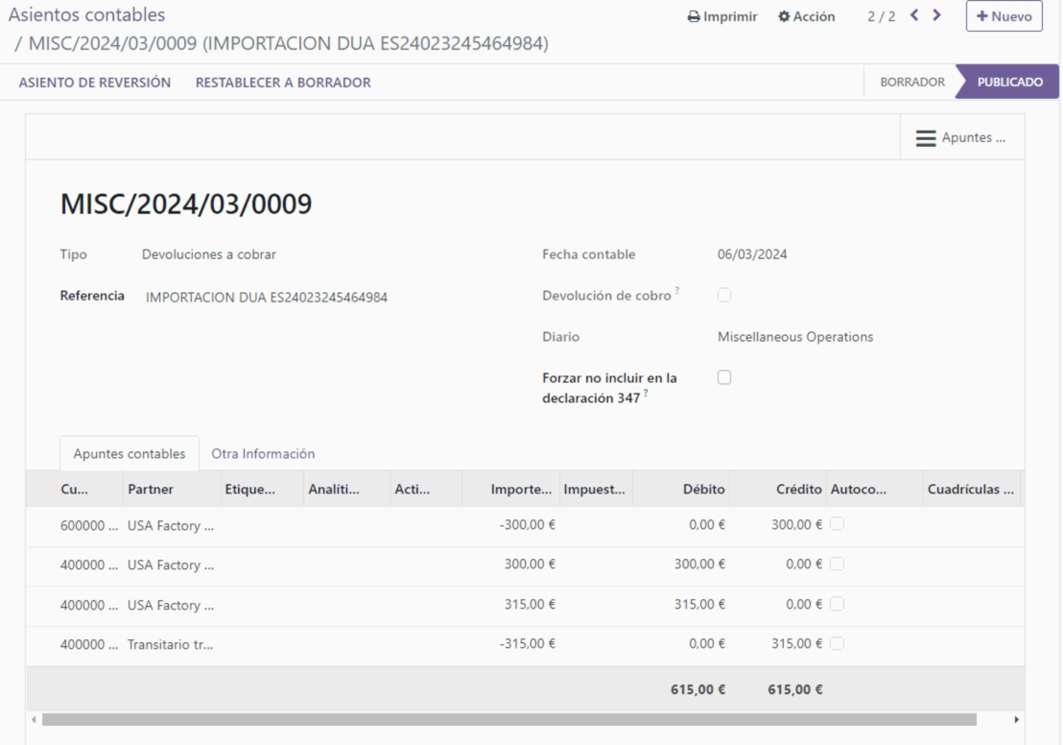
With this adjustment, we now have the invoice from step 1 of the DUA accounting reconciled with the adjustment entry of bases and this last one of transferring the VAT amount to the freight forwarder, ready to reconcile it with the payment made to the import supplier.
Likewise, when in the bank statement we go to reconcile the invoice of the customs agent (freight forwarder) with their payment, we will be able to reconcile the payment with the invoices of the freight forwarder for fees, duties and with this last entry, leaving both invoices from step 1 (the DUA of the importer) and step 2 (the invoices of the freight forwarder) completely settled.
We remain at your disposal and remind you that you have access to courses and support and training hours for Odoo. Best regards
Do you have questions?
Contact us or watch our explanatory video on how to correctly account for an import in Odoo Spain whether we are in the SII or not in the SII